

Where to find Projects
Projects are located in the Innovation Management tab in the main navigation. Go to Innovation Management → Projects.
Who can do this? Site Admins, Community Admins, and Project Managers can create a Project.
Managers are users added in Project Settings with permission to create Projects.
Note: Challenge Managers can also create a Project from a Challenge Idea, even if they are not a Manager.
How to create a Project
Projects can be created in three ways:
From the Project page
- Go to Innovation Management > Projects
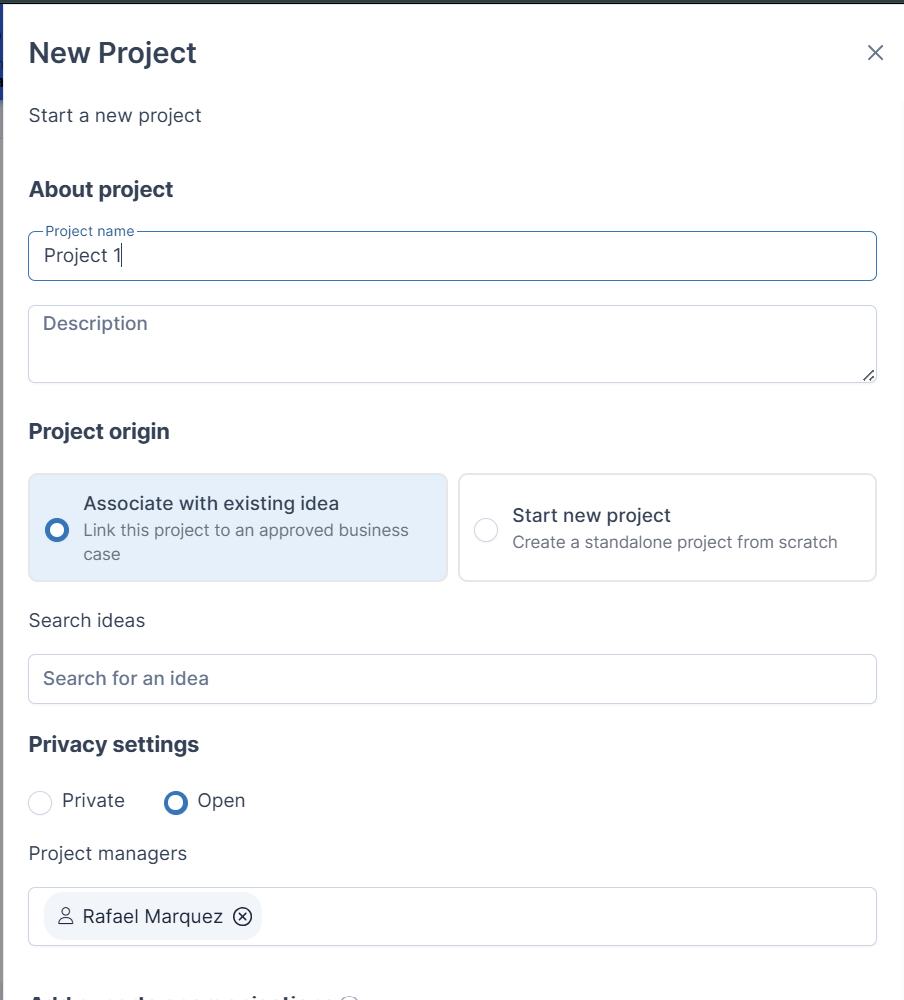
- Click Add Project and fill out the form
- Add a Project Name and Description
- Choose to:
- Link an existing Idea, or
- Create a standalone Project
- Select Privacy settings
- Private (seen by project managers and members)
- Open (seen by all Full Contributors or community members)
- Add Project Managers
- Add Experts or Organizations (optional)
- Review the Framework information modal
- Select a Framework or skip
- You will be taken to the Project board
From the Framework page
- Go to Innovation Management → Frameworks
- Select a Framework template
- Click Add Project
- Complete the Add Project form
- Add a Project Name and Description
- Choose to:
- Link an existing Idea, or
- Create a standalone Project
- Select Privacy settings
- Private (seen by project managers and members)
- Open (seen by all Full Contributors or community members)
- Add Project Managers
- Add Experts or Organizations (optional)
- Click Save Project
Note: This method skips the Framework selection step.
From an Idea
Who can do this? Challenge Managers can also create a Project from a Challenge Idea.
- Open a Challenge
- Select an Idea/ideas
- Click On the 3 dots → Start Project
- Complete the Add Project form
- Add a Project Name and Description
- The Associate with existing idea will be selected.
- Select Privacy settings
- Private (seen by project managers and members)
- Open (seen by all Full Contributors or community members)
- Add Project Managers
- Add Experts or Organizations (optional)
- Click Next
- Review the Framework modal, scroll through the frameworks available
- Select a Framework or skip
- Click View Project