

When Jen recommends an organization in your chat, you can add it directly to your Ecosystem and a Campaign to receive updates and easily jump back into the organization’s profile.
Who can do this? All members with access to Wazoku Scout. For more information, see Configure Wazoku Scout access permissions.
How to add an organization Jen recommended to Ecosystem or a Campaign
- Go to your Jen chat.
- Enter prompt such as “I want to find partners currently working on developing agricultural tools for sustainable farming in Europe.”
- Jen will return a list of relevant organisations.
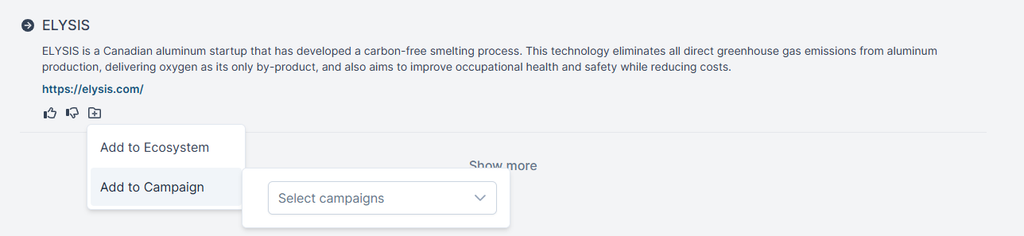
- A folder icon will be displayed next to each Organisation. When clicked, a dropdown menu appears with two options:
- Add to Ecosystem – select to add to Ecosystem
- Add to Campaign – select to add to Campaign and a list of available Campaigns is shown, select one or more and click Save. It will also be added to Ecosystem
The organization will be added to your Portal / Ecosystem where you can edit the organization, add a note, and complete evaluations. Any Products and Service offered by the Organisation will also be added to the Product and Service section of the Organisation profile in Ecosystem.
Note: If an Organisation has already been added to Ecosystem but not a Campaign you will see the Folder icon with a tick. If you click the icon an Add to Campaign option will appear.
See also