

If you’re assigned to a Challenge as the Lead Evaluator, you can submit the final evaluation decision for Idea/s under evaluation.
Who can do this? Lead Evaluators for assigned Challenges or Ideas.
Submit an evaluation decision from an idea
- Open the Idea you want to make a decision on.
- On the Evaluation tab you can see the details of the evaluations submitted by evaluators. You can view by Evaluator or criteria.
- Select the Submit decision tab
- Select your decision and reason.
- (Optional) Enter a personal message for the decision reason.
- (Optional) Select Publish message on status update tab.
- Click Submit decision.
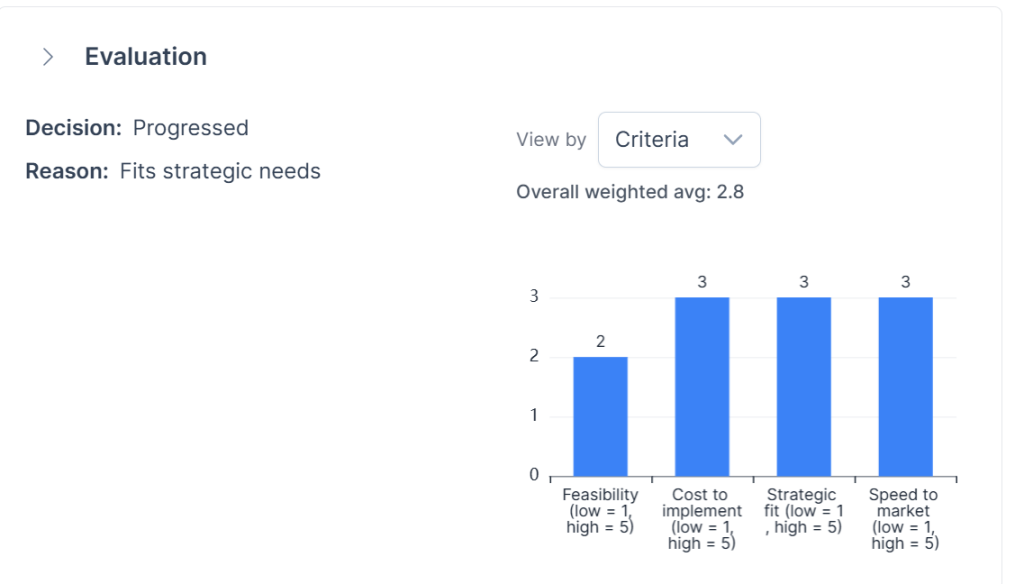
Review Idea evaluation scores by challenge
You can also view Evaluation analytics for all ideas on a challenge by going to the challenge page, selecting Evaluation and then Evaluation analytics.
Here you can see an analysis of submitted evaluations. You can view the data either Weighted or Raw and drill down into each evaluated idea to see individual scores by evaluator.
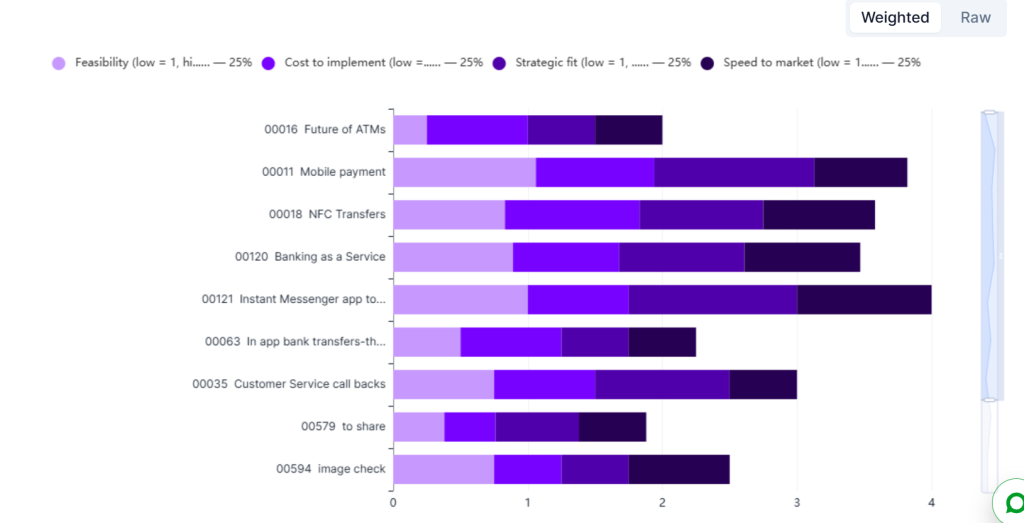
- Select the challenge you are evaluating
- Select the Evaluation tab then Evaluation analytics
- When you are ready to make decisions select one or more ideas
- Select Manage ideas
- Select your decision and reason.
- (Optional) Enter a personal message for the decision reason.
- (Optional) Select Publish message on status update tab.
- Click Next then Submit
See also