You can link to the following platform entities in your reports:
- challenges
- ideas
- communities
- conversations
- creators
- evaluators
- idea managers
- users
How to add hyperlinks to your reports
- Go to your report, select Edit Mode
- Select the widget you want to edit
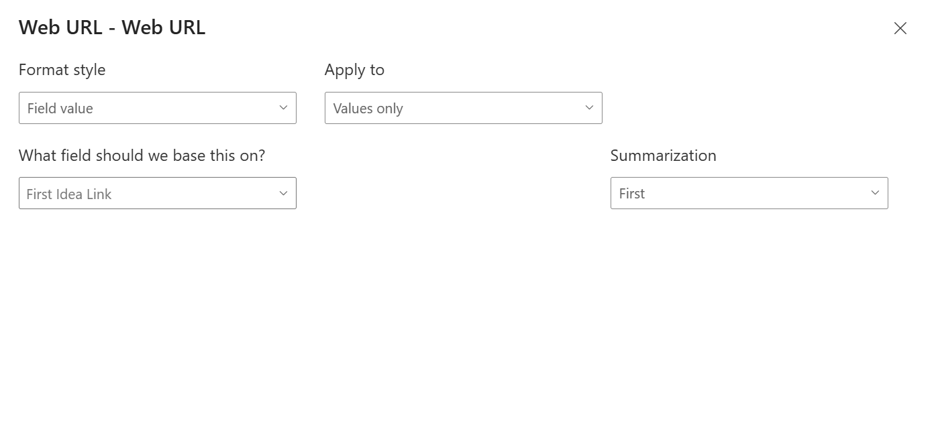
- In the Visualizations tab > Format visual settings find the Cell elements option as shown in screenshot 1 below
- Select the name of the correct column header from the Apply settings to dropdown
- Find the Web URL option and toggle to On
- A modal will open as shown below in screenshot 2
- Select OK
- Select the correct linked item in What field should we base this on? Using the search you can find:
- challenge link
- community link
- conversation link
- user link (Creator, evaluator, idea manager, general user)
- Idea link
- Organisation link
- Switch to View mode and save your changes
- You will now see the hyperlinked properties
Screenshot 1
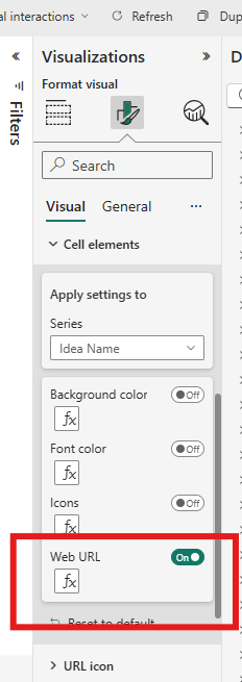
Screenshot 2