

This guide helps you get started with some commonly used functions for using our APIs.
This guide covers:
- discover the form fields required to submit an idea
- create and edit ideas (including drafts)
- check and update idea status
- update stage status via review decisions
Note: the examples below assume you already have a valid API token or OAuth access token.
1. Find required form fields for a challenge
You cannot guess form_data. It must match the current stage idea form for the challenge. Fetch it first, then build your payload using those questions[].id.
Option A: include current_stage_forms on the challenge
GET /api/v5/challenges/{challenge_id}?include=current_stage_formsOption B: dedicated endpoint
GET /api/v5/challenges/{challenge_id}/current_stage_forms
From that response, build form_data as a JSON object where:
- checkbox/select fields use option ids
- keys are the
idvalues fromquestions[] - required fields must be present
2. Create an idea (draft)
Endpoint:
POST /api/v5/ideasBody example:
{
  "challenge_id": "8273fbb0d76b443ab6ee6d4fa7f3f582",
  "is_draft": true,
  "form_data": "{\"title\":\"Reduce line changeover time\",\"6c2c73debec14ceda1e98dfc5e844f88\":\"Shorter changeovers via standardized tooling.\",\"bb26d76c1bb4464b900a8b239863f98e\":[\"0041460f482a4097b460758cd2fbf890\"],\"36da9da70eaf48cdab0b16ba61465389\":\"0c0efca4899244789332f52eb183ce8c\",\"f3bec6f488b74ae098d62cce305ffcdf\":\"dfe5d43e7c204f8b8fb7aa4b94240063\"}"
}
Notes:
form_datais a JSON string (not a nested object).MultipleCheckboxexpects an array of option ids.Selectexpects a single option id.- Only include fields that exist in
current_stage_forms.questions.
3. Edit an idea (draft or published)
Endpoint:
PUT /api/v5/ideas/{idea_id}Body example (only change a subset of fields):
{
  "is_draft": false,
  "form_data": "{\"title\":\"Reduce line changeover time (v2)\",\"6c2c73debec14ceda1e98dfc5e844f88\":\"Added tooling checklist and 5S audit plan.\"}"
}
4. Check idea status
Endpoint:
GET /api/v5/ideas/{idea_id}Look at:
status(idea status)is_draftcurrent_stage
5. Update idea status (review decision)
Idea status changes are often driven by stage review decisions.
Endpoint:
POST /api/v5/stage/{stage_id}/decisionBody example:
{
  "ideas": "a1b2c3d4e5f6g7h8i9j0",
  "decision": "accept",
  "message": "Looks good. Proceed to next stage.",
  "progression_reason_id": "optional_reason_id"
}
To discover valid progression reasons:
GET /api/v5/progression_reasons6. Put an idea on hold / take off hold
Put on hold:
PUT /api/v5/ideas_put_on_hold{
"idea_ids": "a1b2c3d4e5f6g7h8i9j0",
"challenge_id": "8273fbb0d76b443ab6ee6d4fa7f3f582",
"message": "Needs additional data from operations.",
"on_hold_until": "2029-10-09 16:00:00+00:00",
"publish_message": false
}Take off hold:
PUT /api/v5/ideas_take_off_hold{
"idea_ids": "a1b2c3d4e5f6g7h8i9j0",
"challenge_id": "8273fbb0d76b443ab6ee6d4fa7f3f582",
"message": "Data received, resuming evaluation.",
"publish_message": false
}7. Using the Idea Rating endpoint
You can first use /api/v5/challenges/{challenge_id} endpoint and check a challenge that is using the rating system you want to check. Then you can look at “rating_system” value to get the rating ID to use in the idea_ratings endpoint
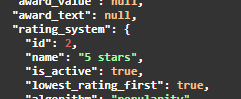
Then use the idea_rating endpoint, adding the id into the parameter for rating_system_id
GET /api/v5/idea_ratings?include=rating_option%2C%20idea_id&include_descendants=false&rating_system_id=2"created": 1765980241,
"idea_id": "31657b2bf079477cbe5a56c7ada39132",
"rating_option": {
"id": 133,
"name": null,
"value": "5.00",
"icon": "fa-star-o",
"icon_color": "#000000",
"selected_icon": "fa-star",
"selected_icon_color": "#000000"Note: Custom rating system id will follow the order the ratings were created. So if you had 4 rating types and then added a new custom one that id would = 5.
8. Returning Idea form fields for a challenge
Make a call to the endpoint:
https://public-api.wazoku.com/api/v4/ideas/{{ idea_couch_id }}?include=custom_fields,data
We’ll use the data query parameter to get the Idea form field values. The custom_fields parameter is used if a form has custom fields. If not, you can omit the custom_fields parameter.
This will return the relevant Idea information. Here an example from a mock:
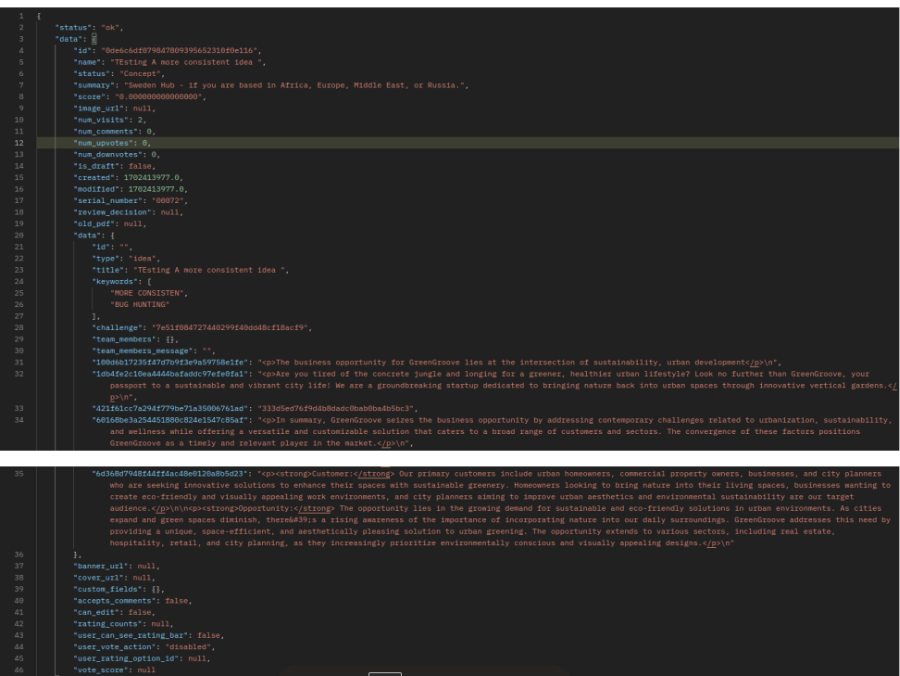
Some fields are easy to understand, but others appear as a “field_id”: “value” relationship. For example, “421f61cc7a294f779be71a35006761ad”: “333d5ed76f9d4b8dadc0bab0ba4b5bc3”. We need to call a second endpoint to get the field values for their respective id. Take the Challenge couch_id from the response, and use it in the following endpoint:
https://public-api.wazoku.com/api/v4/challenges/{{couch_id}}/current_stage_forms
This will return each stage form with their respective id and value, where we can get some more info about the field, such as the type, label, label_translations, etc.
Troubleshooting tips
If you get challenge_id.not_exists, verify you are using:
- the challenge Couch ID (not an internal numeric id)
- a token from the same site/domain as the challenge
If you get validation errors, re-check:
- required fields in
current_stage_forms.questions - option ids for select/checkbox fields
- that
form_datais valid JSON and is passed as a string